



Internal Audit
AuditBoard Recognized in G2’s 2026 Best Software Awards Learn More
January 23, 2026 • 17 min read

Toby DeRoche
All audit leaders are familiar with the frustration of writing audit reports. You finish the audit, confirm the findings, tie out the documentation, and then agonize over every word in the report. Even then, you still never know if management will actually read the report or just skim the first page. Now, we have a better way to handle audit reporting.
Audit leaders recognize the potential that AI and automation have to enhance audit reporting quality. Through AI and automation, audit teams can produce reports more quickly and with higher quality, so you can focus on the insights you want to share with stakeholders.
By linking actionable audit findings directly to organizational objectives, your internal audit report influences management’s direction. When stakeholders actively use your audit findings to inform risk management decisions, your audit team will be viewed as a strategic partner rather than a compliance function.
In this article, we’ll explain several key best practices you can adopt to leverage available technology and build actionable reports.
Effective audit reports communicate the message your team wants to share with stakeholders. The challenge is to grab and hold the reader’s attention. Realistically, no one has time to read through pages of detail on your testing, so the report must get straight to the point, include clear, judgment-free conclusions, and every finding included in the report should tie directly to a business objective. Anyone who reads your report, whether it’s the process manager you are auditing or the audit committee, should immediately understand how your audit fits into the organization’s goals.
Effective audit reporting adds value to the organization by providing a deeper understanding of the risks and controls that impact future operational success.
Audit reports are your primary means of communication. When you provide your audit committee reports that clearly explain the business impact of the work your team completed, and offer practical next steps as corrective actions, they are more likely to seek out your opinion as a trusted advisor. You will find that they bring you into strategic conversations earlier and more frequently.
Even experienced internal auditors have room for improvement in their audit reporting skills. To help you save time, improve your credibility, and drive overall increased effectiveness in audit reports, we have gathered five best practices used by leading audit teams.
Your audit team speaks fluently about risk assessment and internal controls, but you may be using terminology that is not common to everyone. When reports overflow with methodology details, you could lose your audience before they reach your actual findings.
For example:
Remember that the audit report is a communication tool, so we need to write for the reader’s benefit.
Starting the audit report with a clear, concise executive summary that highlights any unmitigated risk exposure found during the audit will ensure your main message is not lost. The executive summary can include enough detail to make your point, and the detailed findings are included so the reader can dig deeper if they need more information.
Here’s an example of an effective executive summary:
"In performing an audit of our cloud computing vendors, we found three critical issues that could expose the company to a cybersecurity breach: weak change management controls, missing data backups, and inadequate access management. Individually, each presents operational and compliance risks; together, they create a compounded exposure that threatens the integrity, confidentiality, and availability of the organization’s data hosted in the cloud.
Collectively, these issues indicate an immature IT control environment that lacks the safeguards necessary to support secure and resilient cloud operations. The combination of unmanaged change, weak access governance, and inadequate backup protection exposes the organization to data loss, business disruption, regulatory noncompliance, and reputational damage.
Immediate remediation is recommended, with priority given to implementing a structured change management framework, strengthening identity and access management controls, and establishing tested, redundant backup and recovery procedures."
Having a brief and impactful executive summary becomes especially critical for public companies where audit committee members juggle multiple board responsibilities. We should always communicate what they need to know in a manner that works for their busy schedule.
Improving data visualization in audit reports can also enhance your ability to communicate complex findings in a simpler format. By using a standard approach to building charts and graphs, you can ensure a consistent message to your stakeholders.
Consider using these best practices for visual storytelling:
Audit reports should never read like academic exercises disconnected from business reality. Your audit results matter, and a successful audit provides insight into the control environment related to the business objectives under review.
When your audit objectives don't align with the organization's strategic objectives, your leadership may question the point of the audit and its impact on the overall business.
One way to quickly connect audit and business objectives is to add a summary statement at the very beginning of the report. Try using the Bottom Line Up Front (BLUF) approach to start your reports. For example, use more specific sentences like, "We conducted an audit of our cloud service providers because weak data center controls have cost similar companies millions in cybersecurity and fraud losses, and risk management has ranked cybersecurity as our organization's highest priority risk."
In addition to the overall audit objective, you can connect every finding back to business priorities, and you can explain how control weaknesses could impact the success of strategic initiatives.
The best audit reports incorporate input from your stakeholders. Create simple ways for report recipients to share what's working and what could use improvement. You can even use post-audit surveys to ask directly whether your recommendations were practical and if your communication was clear.
Also, during audit committee meetings, the Chief Audit Executive (CAE) should ask members if there is any information they would like to see highlighted or removed based on their experience with other organizations. The feedback you get through these approaches helps you improve your communication in future reporting.
Effective audit reports often share common elements that drive action. These common elements include:
Your executive summary should clearly communicate the main themes of the audit. Most busy executives scan the first page and decide whether to keep reading or forward it to someone else. Your opening statement needs to immediately establish what matters most. Start by summarizing your highest priority findings and their business impact, not your audit scope or methodology.
Present issues based on risk ranking related to potential business impact. For instance, a poorly designed control that could lead to business disruption should be listed before controls with operational exceptions.
For another approach, you could link your internal control findings to current business conditions. If the company is expanding internationally, you can highlight control gaps that impact growth. During periods of economic uncertainty, emphasize findings that affect financial stability or cash flow management.
Clearly explain how unmitigated risks can impact business objectives, providing executives the context they need to make informed decisions.
As a standard audit practice, always include the required elements when writing an issue. Not only does this format ensure you have communicated the essential details, but it also results in less pushback from stakeholders who are reading the report.
Most auditors are familiar with the 5 C’s of issue writing: criteria, condition, cause, consequence, and corrective action. Pay special attention to the consequences, since this is an opportunity to link the issue to the risk and highlight a potentially larger problem if this is not addressed. If you have access to AI, it can be a huge timesaver if you need help drafting an issue in this format.
Manual reporting processes create bottlenecks that delay insights and frustrate stakeholders. Smart automation eliminates these pain points while improving report quality. Here’s how:
Creating charts or reports uses resources that could be spent on analysis. Additionally, the manual nature of reporting introduces opportunities for formatting errors that can detract from the message your team wants to convey.
Instead of rebuilding charts and graphs for each engagement, use templates that pull data directly from your audit management system and use a platform that automatically updates the content based on real-time data flows.
As a simple example, you could design a reusable template with your organization's branding and a pre-approved format and layout for issue reporting. As the team matures, you can create customized dashboards with specific metrics that allow the viewer to drill into details for more information. Having prebuilt, ready-to-use reports and dashboards saves time that can otherwise be spent on valuable audit work.
Automating version control and collaboration adds another layer of depth to your reporting. Modern audit platforms offer collaborative editing capabilities, allowing multiple team members to contribute to reports without creating conflicting content. When your internal audit team can work simultaneously on different sections, you reduce bottlenecks that can occur when trying to meet deadlines at the end of an audit project.
The same concepts apply when you are reviewing draft reports. Report version control should be included, allowing reviewers to add suggestions and commentary with features like track changes, so it’s clear what changes were made and why.
Writing quality and grammar check
Finally, AI can save a massive amount of time and frustration by generating first drafts of executive summaries, scoping memos, issue descriptions, and risk implications based on audit findings. Offloading this chore allows audit leaders to focus more time on analysis and recommendations, rather than rewording and formatting. Using AI also helps ensure consistent tone, terminology, and structure across reports. Of course, you still have to review the draft for accuracy, but the burden of writing can be eliminated almost completely.
Modern audit teams need reporting capabilities that provide visibility into the organization’s risk and control environment. AuditBoard's platform addresses the core challenges that prevent audit reports from driving real business value.
AuditBoard also understands that your stakeholders need information tailored to their needs. That’s why we include exportable, customizable visuals to provide actionable insights for your team and your executive stakeholders. We offer interactive dashboards that let executives drill down into specific risk areas or zoom out for enterprise-wide views.
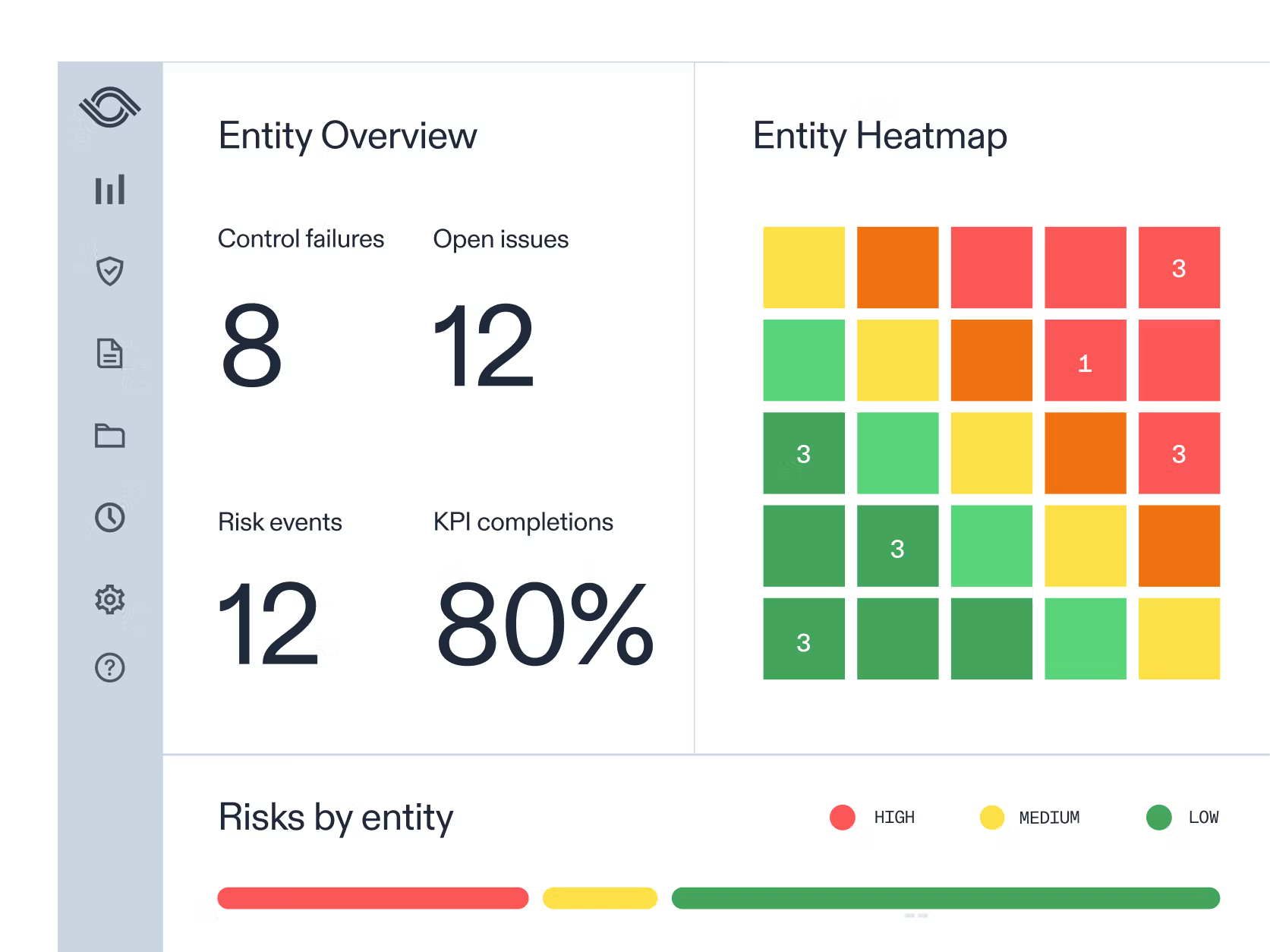
AuditBoard’s reporting dashboard (Source)
Plus, real-time data updates ensure you and your audit committee always have the current status rather than outdated snapshots. Thomas Lelu, Internal Audit and Internal Control Manager, Constellium, says:
“Since implementing our program with AuditBoard, we've observed significant qualitative and quantitative improvement. This includes audit efficiency, issue resolution, reporting, and stakeholder satisfaction. With everything tracked and stored in AuditBoard, we've eliminated the need for physical paperwork or scanned signatures.”
The platform's customizable templates eliminate the inefficiencies that bog down traditional reporting processes. Instead of recreating formats for each audit type, teams can focus on analysis and recommendations.
The platform allows you to access collaborative features that streamline the review process. For example, review comments and feedback flow directly through the system, eliminating email chains, lost context, and version control issues.
You can build custom workflows to route tasks and action items to the right team members, streamlining the review process so the audit team members can address critical items. John Concillo, Controls and Compliance Senior Associate, Cornerstone OnDemand says:
“What's great about AuditBoard is that you can see everything from a dashboard level. You can see what controls are still open, what controls are finished, and what processes are finished. One aspect that I love is the tagging feature. If I have a question for my manager, I can just tag her. She'll get a notification in AuditBoard and also an email notification.”
If you want to deliver impactful audit reports faster with AuditBoard's connected platform, request a demo today.
Toby DeRoche, CISA, CIA, CRMA, is an experienced internal audit professional with over 15 years in internal audit, fraud examination, and technology consulting, currently working as an IT SOX Risk Manager at Verizon. He is also an experienced speaker and writer, having delivered many whitepapers, blogs, and presentations on assurance topics, and the author of the book Agile Audit: Transformation and Beyond. As the founder of Insight CPE, LLC, Toby is dedicated to advancing the profession by providing meaningful continuing education for assurance professionals. Connect with Toby on LinkedIn.